Lance Docs
Search Front Desk, Ops, Sales, boards, FAQs...
FAQsSupport
Start
Documentation homeDocs libraryHotel onboarding
Products
Front DeskOpsSales
Reference
Admin settingsProduct FAQsSupport

Product documentation

Everything hotel teams need to use Lance.

Guides for the three Lance workspaces: Front Desk for guest calls, Ops for property execution, and Sales for lead capture and follow-up.

Front Desk docsOps docsSales docsOnboarding guide

Docs library

Choose what you are trying to do

Start with the product area you use day to day. Each section includes feature guidance, workflows, operating notes, and support context.

Front Desk

Answer inbound calls

Answer inbound calls, respond from approved hotel knowledge, route guests, create follow-up work, and monitor call quality.

Open docs
Ops

Manage room boards

Manage room boards, tasks, housekeeping, maintenance, engineering, staff workflows, and the Lance Pad mobile app.

Open docs
Sales

Capture and manage group

Capture and manage group, event, guest, pre-arrival, upsell, and follow-up opportunities from calls and guest context.

Open docs
AI receptionist

Front Desk

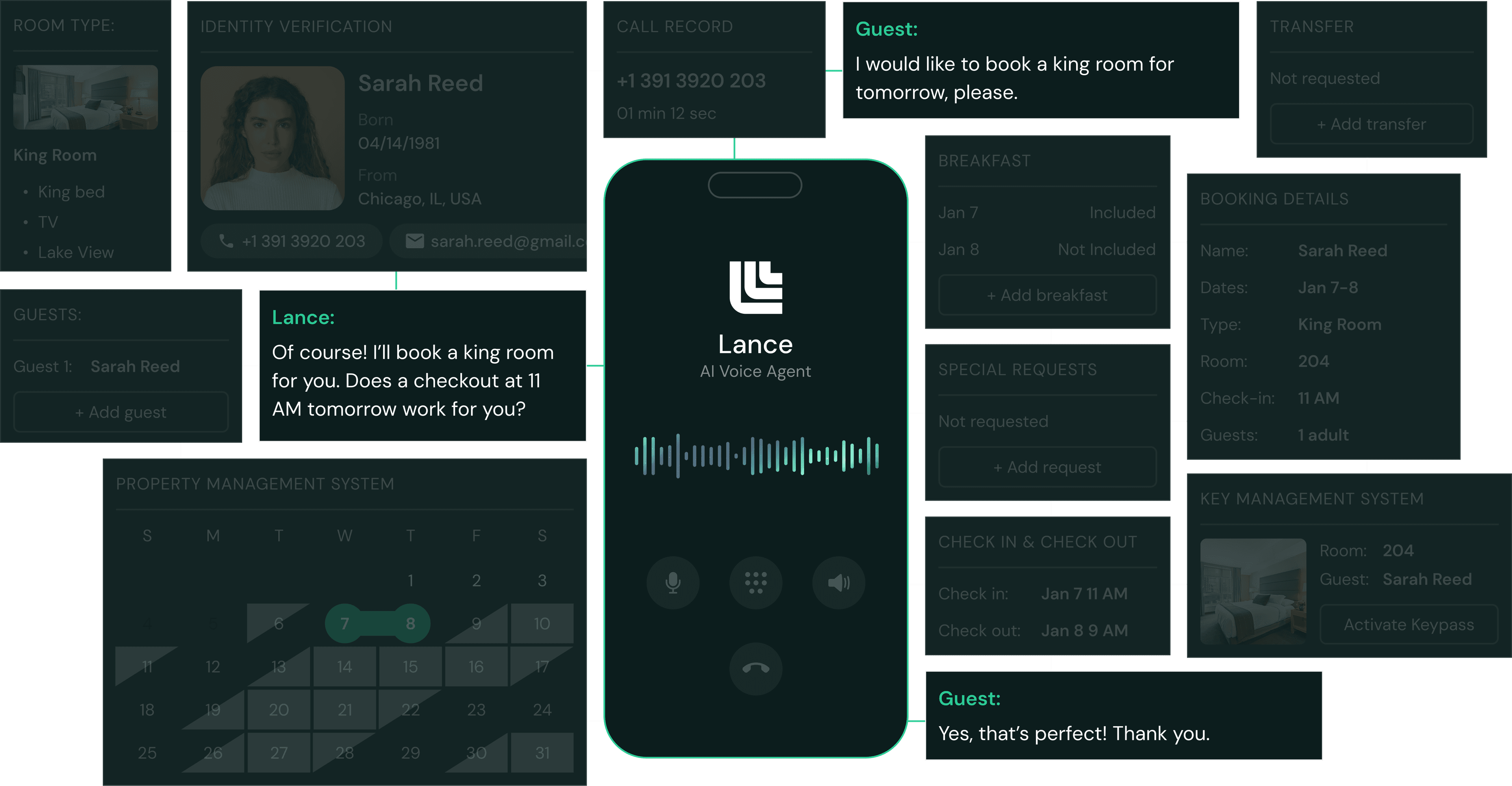
Front Desk is the Lance workspace for guest calls and guest communication. It helps hotel teams reduce repetitive phone work while keeping staff in control of escalations and configuration.

4

Core product guides

Dashboard

Understand guest call volume, outcomes, and recent activity.

What it shows

The dashboard gives managers and front desk teams a current view of call activity, handled-by-Lance outcomes, guest satisfaction signals, recent actions, internal call activity, and work created from calls.

How to use it

  1. 1Select the hotel and the date range you want to review.
  2. 2Check total call volume and how many calls Lance handled without staff intervention.
  3. 3Open recent actions to inspect transfers, wake-up calls, service requests, complaints, and follow-up items.
  4. 4Use spikes, drops, or failed actions as prompts to review knowledge base content or transfer settings.

Calls

Review what happened on individual guest calls.

What it is

Calls is the call history and quality review surface. Use it to understand what guests asked, how Lance responded, whether a transfer happened, and whether follow-up work was created.

Common tasks

  • Search and filter calls by date, outcome, resolution, or source.
  • Open call details to review transcript context and actions taken.
  • Create or review follow-up items when a guest request is unresolved.
  • Use repeated call patterns to improve FAQs, agent instructions, or transfer destinations.

Knowledge Base

Maintain the answers Lance uses with guests.

What belongs here

Store hotel-approved answers for check-in, checkout, parking, breakfast, Wi-Fi, pets, amenities, cancellation policies, local recommendations, accessibility, and other common guest questions.

Writing good answers

  • Write the way a helpful front desk agent would speak.
  • Include prices, hours, locations, exceptions, and guest-facing context.
  • Add alternate phrasings when guests ask the same thing in different ways.
  • Verify answers after prices, hours, policies, or amenities change.

Transfers and Wake-Up Calls

Route calls and schedule time-sensitive guest requests.

Transfers

Configure direct department lines for front desk, sales, housekeeping, maintenance, reservations, or other hotel teams. Front desk should always be configured as the fallback destination.

Wake-up calls

When a guest requests a wake-up call, Lance collects the room, time, and phone details, then records the scheduled call for staff review.

First checks if something fails

  • Confirm the destination number is a direct department line and not the main number routed through Lance.
  • Confirm the hotel's timezone before testing wake-up calls.
  • Review call history and operational alerts for transfer failures.
Daily operations

Ops

Ops is the Lance workspace for running daily property work. It connects supervisors, managers, housekeepers, housemen, maintenance, and mobile staff around the same operational source of truth.

4

Core product guides

Boards

Assign rooms and track housekeeping progress.

What boards are for

Boards show the room workload for a service day. Supervisors use boards to assign rooms, track progress, handle late checkouts, monitor inspector views, and keep daily housekeeping work visible.

How to use boards

  1. 1Choose the hotel and service date.
  2. 2Review checkout, stayover, VIP, late checkout, and room-status indicators.
  3. 3Assign or rebalance rooms across housekeepers, housemen, and inspectors.
  4. 4Track rooms as they move through assigned, in progress, ready for inspection, and complete states.
  5. 5Use reports or manager review when the board needs operational follow-up.

Tasks

Coordinate houseman, housekeeping, maintenance, and complaint work.

What tasks track

  • Houseman requests such as towels, pillows, amenities, luggage, and supplies.
  • Maintenance requests such as AC, TV, plumbing, electrical, and room defects.
  • Complaints that require immediate staff attention and follow-up.
  • Manual manager tasks that need accountability outside a guest call.

How to manage tasks

  1. 1Create the task with a specific room, area, and description.
  2. 2Assign it to the correct role or staff member.
  3. 3Filter by status, assignee, type, source, or urgency.
  4. 4Close the loop once the work is complete.

Lance Pad

Mobile workflows for floor staff.

What staff can do

  • Sign in through the hotel device flow and staff PIN.
  • View assigned rooms, tasks, checklists, announcements, and messages.
  • Update room status and task progress from the floor.
  • Capture photo or video proof when required.
  • Use DND walkthroughs, departures lists, and other guided workflows.
  • Switch language and text size from the profile menu.

Setup note

Keep staff names, roles, preferred languages, hotel assignments, and PIN access current so mobile staff see the right work and managers can trust completion status.

Engineering

Readings, preventive maintenance, room workflows, and history.

What it includes

Engineering supports readings, PM templates, PM instances, room-view workflows, history, schedules, and settings for recurring property maintenance work.

Typical workflow

  1. 1Create or review a PM template.
  2. 2Assign rooms, equipment, areas, or steps.
  3. 3Track open PM instances and completion history.
  4. 4Use readings to standardize recurring meter, boiler, or area checks.
Lead capture

Sales

Sales is the Lance workspace for turning guest and group interest into structured follow-up. It keeps call context, inquiry details, guest profiles, briefs, and revenue opportunities in one place.

4

Core product guides

Sales Calls

Review voice-led sales opportunities.

What it captures

Sales calls track conversations related to events, weddings, meetings, group blocks, corporate travel, and high-value guest requests.

How to use it

  1. 1Review new sales call records each day.
  2. 2Open the call to understand caller intent and captured details.
  3. 3Convert qualified interest into an inquiry or follow-up action.
  4. 4Use call history to improve routing and sales capture.

Inquiries

Structured lead records for sales teams.

What to track

  • Event or group type, dates, and expected attendance.
  • Room block size, budget, catering needs, and special requirements.
  • Caller contact details and preferred follow-up channel.
  • Owner, status, next step, and notes.

Operating principle

The goal is not only to capture a lead. The goal is to make the next sales action obvious.

Guests and Pre-Arrival

Use guest context to improve follow-up.

Guest profiles

Guest profiles help sales and hotel teams understand prior interactions, preferences, active opportunities, and context for follow-up.

Pre-arrival

Pre-arrival workflows support check-in readiness, special requests, upgrade opportunities, and proactive guest communication before arrival.

Upsells and Briefs

Revenue and team-readiness workflows.

Upsells

Track opportunities such as late checkout, room upgrades, packages, amenities, and other hotel-defined offers.

Briefs

Use briefs to summarize important upcoming guests, open opportunities, risks, and action items for the team.

Onboarding

Set up a new hotel

Onboarding gathers the hotel-specific details Lance needs before launch. Split the setup across the people who know each area best.

StepWho should helpWhat to prepare
Hotel detailsGM or account ownerAddress, timezone, Lance phone number, and core hotel context.
FAQ verificationFront desk managerAccurate answers for check-in, parking, amenities, breakfast, pets, policies, and local questions.
Staff membersDepartment managersRoster, roles, emails for managers, preferred languages, and mobile access needs.
Call transfersFront desk or phone-system ownerDirect department numbers for front desk, sales, maintenance, housekeeping, and reservations.
Room configurationHousekeeping or rooms controllerRoom list, room types, floors, board areas, late-checkout rules, and role-specific board logic.

Admin reference

Settings that keep Lance accurate

Most product issues come from stale configuration. Keep these areas current as hotel operations change.

Team

Maintain departments, roles, staff profiles, access, languages, emails, and mobile access.

Rooms

Maintain room inventory, room type aliases, floors, areas, board rubrics, and exclusions.

Devices

Register tablets, review device status, confirm hotel binding, and monitor staff device usage.

Transfers

Keep department destinations current so calls do not route to the wrong number or loop back.

Notifications

Configure alerts so the right role sees activity for Front Desk, Ops, or Sales context.

Security

Review account security controls, access patterns, and operational safeguards.

FAQs

Common product questions

What is the difference between Front Desk and Ops?

Front Desk handles guest calls and guest communication. Ops handles the work those interactions create: room boards, tasks, maintenance, staff, and mobile workflows.

Where should hotel staff update incorrect AI answers?

Update the Knowledge Base. Find the relevant FAQ, edit the answer, add variations if needed, and verify the content.

What should managers review every day?

Review call outcomes, unresolved actions, room board progress, open tasks, high-priority complaints, and mobile staff completion status.

What causes too many front desk transfers?

Usually missing FAQs, stale answers, low-confidence FAQ matches, missing variations, disabled tools, or transfer configuration that needs review.

How does Lance Pad fit in?

Lance Pad is the mobile surface for floor staff. It helps staff complete rooms, work tasks, follow checklists, message teammates, and record proof.

What is Sales for?

Sales captures and manages revenue opportunities such as group blocks, events, guest follow-ups, upsells, briefs, and pre-arrival workflows.

Support

Getting help

For product support, onboarding help, access issues, or hotel configuration questions, contact the Lance team.

Customer support
support@lance.live

Use for product questions, onboarding questions, account access, and hotel configuration help.

Lance Product Documentation. Guides for Front Desk, Ops, Sales, onboarding, administration, and support.