The live room status board for hotel housekeeping
Checkouts, stayovers, Do Not Disturb and notes on one board that housekeeping, inspectors and the front desk all see. Built from the PMS report you already print, balanced across your team in half a second, and updated the moment a room changes on the floor.
Trusted by





- + others
One board. Every room. Everyone looking at the same thing.
0.0 sec
To build the day's board
0 min
Board build at AC Hotel SF, was 2 hours
0
Languages on the tablet
0 days
Of clean history per room
Every room on one live board.
Vacant dirty, occupied dirty, vacant clean, inspected, out of order. Each room card carries its status, the service it needs, the checkout time, notes and flags, and it updates the second someone on the floor changes it. Housekeeping, inspectors and the front desk look at the same board.
The room status codes your team already uses (VD, OD, VC, OC, VR, OOO), the service required (checkout clean, refresh, full clean), the room type and who has the room.
Expected checkout times show as a badge on the card, so a 2 PM departure is never a surprise. Add a note in one click and it goes wherever the room goes, including the tablet on the cart.
Do Not Disturb, VIP, pets and out-of-order rooms are marked on the card, and a room can be flipped from occupied to vacant the moment the desk knows the guest has gone.
Built from the report you already print.
No PMS integration needed. Upload the housekeeping report as a PDF, CSV or photo, or paste a screenshot, and Lance turns it into the day's board: rooms, statuses, service, arrivals and departures, checkout times, loyalty status and remarks, previewed before anything lands.
Purpose-built parsers for Hilton PEP, Opera 5, Lightspeed, Power of M (Stay) and HotelKey reports, with AI extraction as the fallback for everything else.
Every extracted field carries a confidence score, the row count is reconciled against the report's printed totals, and you review the preview and column mapping before the board is written.
Rooms recorded on the tablet's DND walkthrough are pre-filled when the board is imported, so a Do Not Disturb sign seen on the morning walk is already on the card.
Assigned in half a second, in your supervisor's style.
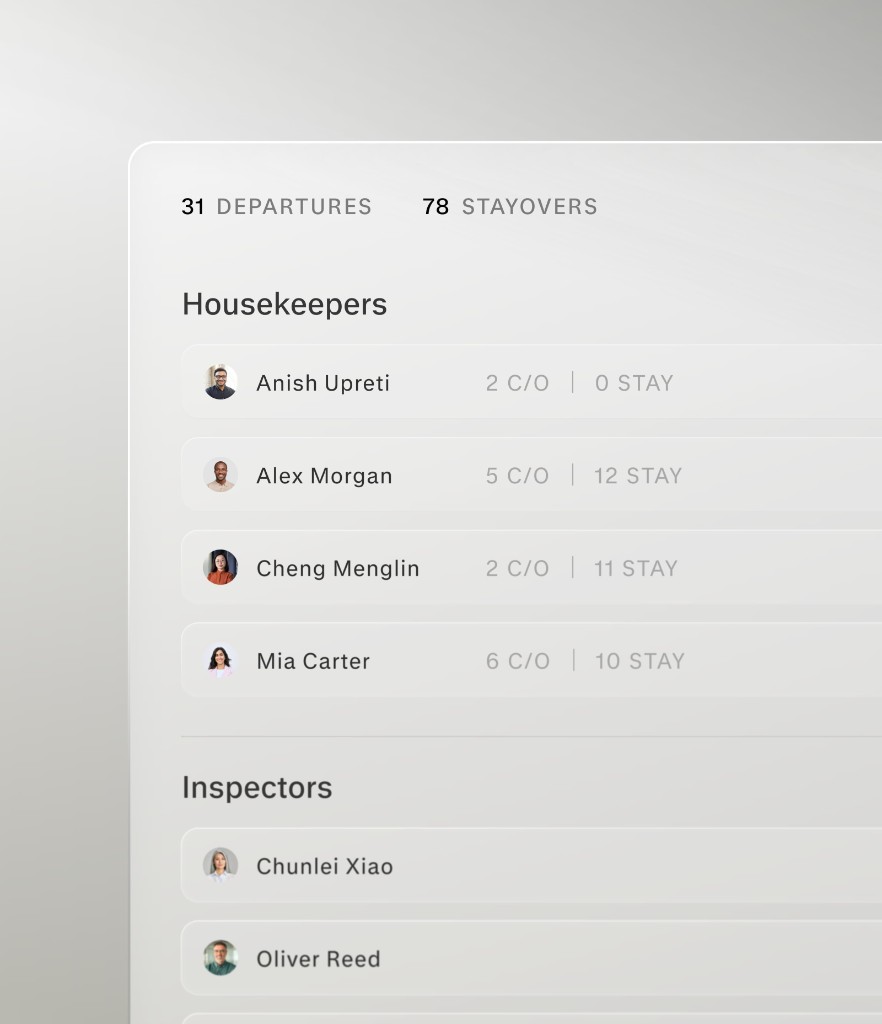
A good supervisor balances checkouts and stayovers, keeps attendants on their floors and sections, and knows who can take a suite. Lance encodes that as rules you set once, then builds the board in about half a second across whoever is on today's schedule. Drag to adjust; rooms you have placed stay put.
Checkouts and queens are spread evenly first, section owners take their own range, room counts are evened out, and each attendant stays on as few floors as possible.
Maximum rooms, checkouts, queens, suites and floors, hotel-wide or per person. A limit is a stop: an attendant at their cap stops receiving that kind of room and the deal continues over everyone else.
Save presets like Weekday or Weekend Heavy and mark one active. Who appears on the board comes from the labor schedule and the board roster, with one click to exclude anyone from auto-assign.
On the cart, in their language.
Each attendant opens the tablet and sees their rooms for the shift: status, service, checkout time and notes, in English, Spanish, Chinese or Portuguese. A tap completes a room. Do Not Disturb, a houseperson request, a maintenance flag or a photo is one more. It keeps working through Wi-Fi dead spots.
Housekeepers see the rooms assigned to them; inspectors see the rooms waiting on them. A room completes with a tap: vacant dirty becomes vacant clean, occupied dirty becomes occupied clean.
A note typed at the desk shows on the card in the attendant's language. Photo proof can be attached to a room from the tablet camera.
Completions and photos taken in a dead spot are queued on the tablet and sent when the connection returns. The board never waits on the Wi-Fi.
Inspected, noted, and on the record.
Clean is not the same as inspected. Inspectors sign off from the tablet with a rating and notes, the inspector board groups rooms into Not Clean, Cleaned and Inspected, and every change on the board is logged, so the end of the shift is a glance at the board, not a walk of the floors.
An inspector rates the room, leaves notes and attaches a photo, or works a 12-point room and bathroom checklist where a property uses one. A room reads as inspected only when they say so.
Assignments, completions, status changes and inspections appear in the board's activity feed, with the auto-assign's moves kept separate from a manager's. Each room keeps 90 days of past cleans.
Email the day's board to the team from the dashboard, or print it by attendant for the hotels that still want paper on the cart.
Built for the problems a housekeeping supervisor actually has.
Not a prettier spreadsheet. Lance is built around the hours housekeeping loses every day: the morning board, the radio calls, the checkouts nobody knew about, and the walk upstairs to find out what is done.
The board lives on a wall or a clipboard
A supervisor hand-builds it before the first attendant clocks in, and it is out of date by the first early checkout. Lance builds it from the PMS report in about half a second and keeps it current all day.
Room status lives in someone's head
Is 412 done? Who has 305? The answer is a radio call or a walk up three floors. Lance puts every room's status and owner on one live board that the desk, the supervisor and the floor all see.
Early checkouts and DND signs found late
A room that emptied at 7 AM sits untouched until noon. A Do Not Disturb sign breaks the afternoon plan. Checkout times and DNDs sit on the card, recorded on the morning walk or flipped by the desk the moment they are known.
Inspections slip at the end of the shift
Clean and inspected are not the same thing. The inspector board sorts rooms into Not Clean, Cleaned and Inspected, and sign-off is recorded with a name, a time and notes.
How it works
From the morning report to an inspected room, on one board.
- 01
Upload the report
Drop in the PMS housekeeping report as a PDF, CSV or photo. Lance reads it with your PMS's parser, checks the totals and shows you a preview before the board is written.
- 02
Build the board
Auto-assign balances checkouts, stayovers, room types, sections and floors across today's attendants, under the limits you set. Drag anything to adjust.
- 03
Work it from the tablet
Attendants complete rooms, flag Do Not Disturb and request a houseperson from the cart. Inspectors sign off. Notes arrive in each person's language.
- 04
Watch it move
Every change lands on the desk and supervisor screens within about a second, with the activity feed behind it. Email or print the board whenever you want a copy.
Under the hood
Built for the floor, not adapted to it.
Every piece is tuned for how housekeeping actually runs: a report out of the PMS at 6 AM, a tablet on a cart with patchy Wi-Fi, and a supervisor who needs to know what changed without asking.
Live updates
Under a second
Changes stream to every open board over Supabase Realtime, with a safety-net refresh if a connection drops. The tablet queues updates offline and syncs them back when it is online again.
Board source
Your PMS report
PDF, CSV, photo or a pasted screenshot. Purpose-built parsers for Hilton PEP, Opera 5, Lightspeed, Power of M (Stay) and HotelKey, AI extraction for the rest, per-field confidence and a count check against the report's printed totals. No PMS integration.
Auto-assign
Five rules, your limits
Even checkouts, even queens, sections, even room counts, floor cohesion, in that order. Per-attendant caps for rooms, checkouts, queens, suites and floors. Presets saved as rubrics per property.
Tablet
Any managed Android tablet
PIN login per attendant, English, Spanish, Chinese and Portuguese, notes translated into each person's language, photo proof from the camera, and an offline queue for dead spots.
Oversight
Every change logged
Assignments, completions, status changes and inspections in the activity feed, auto-assign moves tagged separately from manager edits, 90 days of past cleans per room, and an emailed or printed copy of the board on demand.
Security
SOC 2 audited
Row-level security scopes every room, note and assignment to its hotel at the database layer, and each tablet is bound to its property.
Security“Fewer missed calls, faster room turns, and a front desk that finally has time for guests.”
FAQ
Questions housekeeping teams ask before they switch.
No. The board is built from the housekeeping report your PMS already prints. Upload it as a PDF, CSV or photo, or paste a screenshot. Lance has parsers for Hilton PEP, Opera 5, Lightspeed, Power of M (Stay) and HotelKey reports and uses AI extraction for other formats, and you preview the result before it lands.
Every change, from a completion on the tablet to a note typed at the desk, streams to every open board within about a second. Attendants complete rooms and flag Do Not Disturb from the cart, the desk flips a room to vacant when a guest leaves early, and the morning DND walk pre-fills the board. Where the AI voice agent is switched on for it, a guest's phone request for a refresh lands on the board as a cleaning request too.
Yes. Sections, floors and per-attendant limits are set once and saved as named rubrics, and the auto-assign follows them: even checkouts first, then queens, sections, room counts and floors. Rooms you have already placed stay put when you run it again, and you can drag anything.
Their own rooms for the shift, with status, service, checkout time and notes in English, Spanish, Chinese or Portuguese. They complete a room with a tap, set Do Not Disturb, request a houseperson, flag maintenance and attach photos. If the Wi-Fi drops, updates queue and send when it returns.
Inspectors see the rooms waiting on them and sign off with a rating, notes and a photo, or a 12-point room and bathroom checklist where a property uses one. The inspector board groups rooms into Not Clean, Cleaned and Inspected, and each room keeps 90 days of past cleans.
Yes. Every room, note and assignment is scoped to its hotel at the database layer with row-level security, tablets are bound to their property, and Lance is SOC 2 audited.
See your board built in half a second.
Book a demo and bring today's housekeeping report. Watch Lance build the board from it, in your supervisor's style, and put it on a tablet.