The mobile operations pad for every hotel shift
Rooms, to-dos, messages and readings on a managed Android tablet at the property. Staff tap their name, enter a 4-digit PIN and see exactly what their job needs. The same boards and tasks as the desktop dashboard, live, in four languages, even when the Wi-Fi drops.
Lance Ops · Android · kiosk on · synced 09:41
Trusted by





- + others
One tablet on the cart, and every room, task and message already on it.
Lance Operations is the tablet app for the people who do the work. It replaces the radio, the clipboard and the walk to the desk with a pad that knows who is on shift, what they are allowed to do and what is due today.
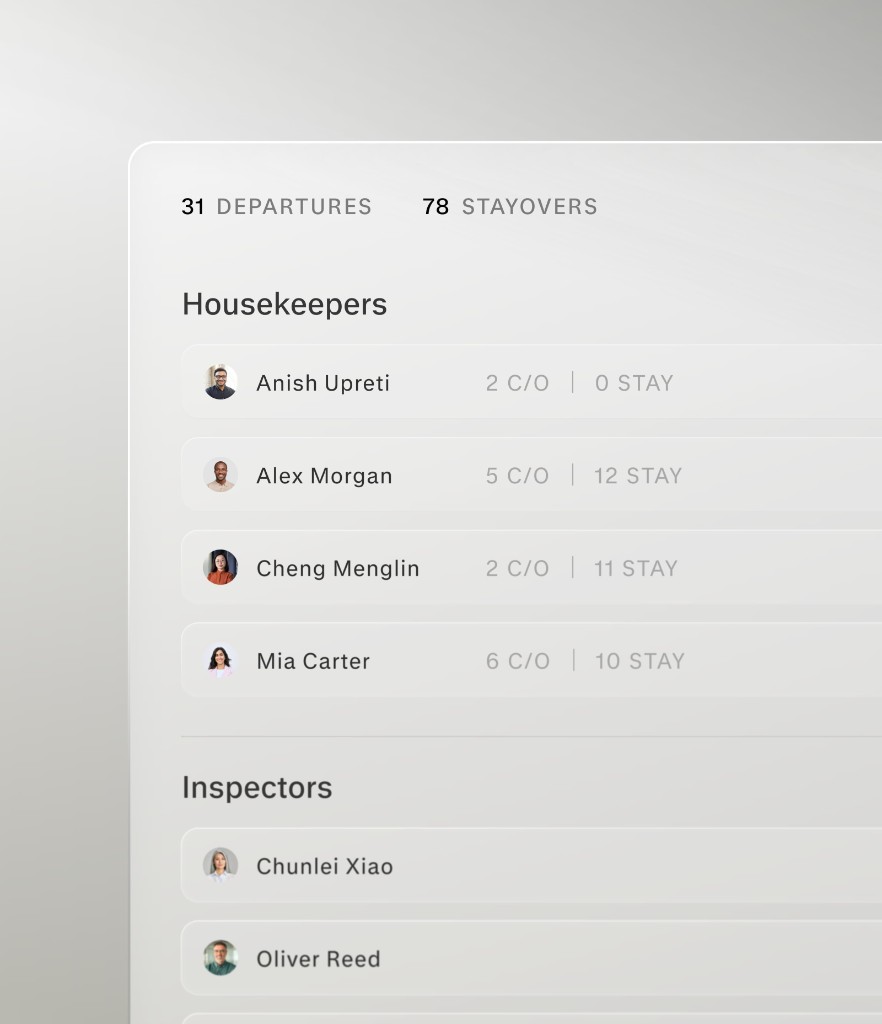
The room board, on every cart.
The supervisor builds the day's board on the dashboard. It lands on each attendant's pad as their rooms: checkouts and stayovers, notes from the desk, Do Not Disturb, late checkouts and early arrivals. Managers see the whole property. A room marked clean on the floor is clean on the board the moment it happens.
Room notes and remarks are translated into the language each housekeeper picks on the pad, and a large-type mode keeps the list readable on a moving cart.
Mark a room clean, set Do Not Disturb, ask for a houseperson or raise a maintenance issue from the room card. Inspectors rate the room and attach photos.
The pad and the dashboard read the same assignments. A status change on the cart shows on the supervisor's board without a refresh, and a new assignment shows on the pad.
To-dos, PM and readings, timed on the record.
Work orders from the front desk, the dashboard or the voice agent land on the Home tab of the people who can act on them. Preventive maintenance and daily readings are due-dated and ready to work. Start, pause and finish from the tablet, and the time spent is saved to the record.
Tap Start when you walk up to the job and Done when it is fixed. Pauses are allowed. Each session is saved to the work order as a time entry, so the record shows real time on task, not a guess.
A PM instance opens as a checklist of steps with photos. If a step turns up more work, raise a work order from inside it, linked back to the PM it came from.
Pool and equipment readings are entered on the pad. An out-of-range value is flagged as you type it, with guidance, and can be escalated to the people who need to know.
Room 905 · Maintenance · Reported by the front desk
- 09:12Started · Luis R.
- 09:24Paused · waiting on a part
- 09:31Resumed
- 09:33Photo added
Time on task is saved to the record when you pause or finish.
- Weekly PM · Pool pump roomDue today · photo on step 43 of 5 steps
- Pool reading · pH 7.4 · Cl 2.0 ppmSubmitted 08:05 · next due 2 pmIn range
Messages the whole team actually reads.
Department chats, direct messages and announcements on the same tablet as the work. Write in Spanish, read in English: messages are translated for each person, voice notes are transcribed, and read receipts show who has seen what.
Every staff member picks their language on the pad: English, Spanish, Chinese or Portuguese. Messages, room notes and task text are translated into it, so one thread works for the whole crew.
Record a voice note and it is transcribed. Attach a photo from the camera. Call a colleague's tablet from the pad; it rings like a phone, even with the screen off.
Post an announcement for the shift, pin a message, mention a person to notify them, and see who has read each message. Department chats and direct messages use the staff roster you already maintain.
Habitación 407 necesita toallas extra y una cuna.
Room 407 needs extra towels and a crib.
Translated from Spanish
Also, the AC in 409 is loud.
Voice note · transcribed
Tap your name. Enter your PIN. Go.
A shared tablet should not mean a shared password. Staff pick their name from today's crew and enter a 4-digit PIN. The next person on shift does the same. Sessions expire on their own, and a manager resets a forgotten PIN from the dashboard.
Pad access is switched on per staff profile. Staff sign in with their name and a 4-digit PIN, never an email address and a password they share with the floor.
The sign-in screen is built from the schedule, so it shows who is on shift today and the next shift for everyone else.
PINs are stored hashed, attempts are rate limited, and a forgotten PIN is reset by a manager rather than passed around the team. Signing out takes one tap.
- LRLuis RomeroHousepersonOn shift
- MGMaria GomezHousekeeperOn shift
- DPDana ParkInspectorNext: Thu 7 AM
Maria, enter your PIN
Everyone sees their job, nothing else.
A housekeeper opens the pad and gets her rooms and the team chat. An inspector gets rooms to inspect. Maintenance gets the work queue. A supervisor sees everything and can assign. Each role comes with sensible defaults, and an admin can adjust access for one person without touching anyone else.
Housekeeper, houseperson, inspector, maintenance, front desk, supervisor and management each start with a preset of what they see on the pad: rooms, inspections, the task queue, assignment.
Give one housekeeper inspection rights, or keep a trainee out of the assignment queue. Overrides apply to that person only and survive later changes to the role.
The bottom navigation is built from what the person can do: Messages for everyone, Rooms for room roles, Home for people who work the task queue. Nothing to hide, nothing to explain.
- HousekeeperRoomsMessages
- HousepersonStrip roomsHousekeeping to-dosMessages
- InspectorInspectionsMessages
- MaintenanceTo-dosMessages
- SupervisorRoomsInspectionsTo-dosAssign workMessages
Per-person override
Locked to the hotel. Working when the Wi-Fi is not.
Each tablet is registered to one property and runs in kiosk mode, so it boots into Lance and stays there. When the signal drops in a stairwell, the pad keeps going: room updates, photos, inspections and messages queue on the device and sync when it reconnects.
The app is the launcher. Staff cannot wander into other apps. A manager exits kiosk with five taps on the logo and the admin PIN, and can switch kiosk on or off per tablet from the dashboard.
Pad screens are cached on the tablet. Changes made offline are queued and sent when the tablet is back online, and sign-in works from the last saved staff list.
Every tablet reports a heartbeat with its app version, battery and connectivity, so you can see from the dashboard which tablets are online, rename them, change the admin PIN and retire a device.
- Registered to
- Your hotel, this tablet only
- Kiosk
- On · exits with the admin PIN
- App
- Up to date
- Last heartbeat
- 2 min ago
- Signed in
- Maria Gomez · Housekeeper
Built for the problems a housekeeping team actually has.
The pad is not a shrunken dashboard. It is built around the minutes that get lost on a shift: the walk to the desk, the password nobody remembers, the list on the cart that is out of date by ten o'clock.
A walk to the desk for every question
Without a login of their own, room attendants walk down to ask what changed. The pad puts today's rooms, notes and requests in their hands, in their language.
One shared password for the whole floor
A tablet signed in as housekeeping means nobody knows who did what. A name and a 4-digit PIN per person means every room, photo and message has an owner.
The paper list on the cart
Printed at 8 AM, wrong by 10. Early checkouts, Do Not Disturb and late checkouts reach the pad as they happen, and a finished room is one tap.
Updates that never reach the board
A room cleaned but never radioed in stays dirty on the board. On the pad, the status change is the same record the front desk is looking at.
How it works
From a new tablet to a full shift in four steps.
- 01
Register the tablet
An admin opens the app on a managed Android tablet, binds it to the property and sets the admin PIN. From then on the tablet boots into Lance.
- 02
Sign in by PIN
Staff pick their name from today's crew and enter their 4-digit PIN. The pad loads their rooms, to-dos and messages.
- 03
Work the shift
Rooms, work orders, PM steps, readings and photos, from the floor. Start and stop timing on the record. Offline changes queue and sync.
- 04
Hand it over
Sign out with one tap, or let the session expire. The next person signs in with their own PIN. Everything they did is already on the dashboard.
Under the hood
Built for a shared tablet on a hotel floor.
A pad that lives on a cart, survives a dropped Wi-Fi signal, is picked up by a different person every shift and still tells the front desk the truth.
Hardware
Managed Android tablets
Lance Operations is an Android app that runs on managed tablets at the property. It can be the device's launcher and run in kiosk mode, with Device Owner lock-down on tablets provisioned for it. Staff can still reach the hotel Wi-Fi settings.
Sign-in
Name + 4-digit PIN
No shared passwords. PINs are stored hashed, attempts are rate limited, and a session expires after a day without use. Admins switch pad access on or off per staff profile.
Access
Per-person capabilities
Every role starts from a preset of what it can see on the pad: rooms, inspections, the task queue, assignment. Admins adjust it per person. Every pad request is tied to that person's session on the server.
Offline
Queue and sync
Pad screens are cached on the tablet. Room updates, inspections, photos, readings and messages made offline are queued and sent when the signal returns, and sign-in works from the last saved staff list.
Updates
Over the air
The app loads from the cloud, so product updates reach every tablet on deploy. The native shell updates itself over the air with an in-app prompt. Tablets send a heartbeat with version, battery and connectivity, visible in the dashboard.
Security
One hotel per tablet
A tablet is registered to one property and its data stays there: per-hotel isolation at the data layer, device and session audit trails, and SOC 2 audited controls.
Security“We’ve gone from refreshing select rooms to refreshing every room, every night. Our cleanliness scores have climbed, while we save labor hours at the same time.”
FAQ
Questions hotels ask before they hand out the tablets.
Managed Android tablets. Lance Operations is an Android app that loads the pad from the cloud, so it can be the tablet's launcher and run in kiosk mode. Each tablet is registered to your property during setup and shows up in your dashboard with its status.
No. Staff sign in on the pad with their name and a 4-digit PIN. Pad access is switched on per staff profile, PINs are set or reset by a manager, and sessions expire on their own. Dashboard users keep their normal login.
Each role starts from a preset. A housekeeper gets her rooms and the team chat; an inspector gets rooms to inspect; maintenance gets the work queue; a supervisor sees rooms, inspections and the queue, and can assign work. An admin can adjust access for one person without changing the role, and the pad's tabs follow what that person can do.
The pad keeps working. Its screens are cached on the tablet, and room updates, inspections, photos, readings and messages made offline are queued and sent when the signal returns. A small banner shows what is waiting to sync, and sign-in works from the last saved staff list.
Not in kiosk mode. The app is the launcher and stays in front. A manager exits kiosk with five taps on the logo and the admin PIN, and kiosk can be switched on or off per tablet from the dashboard.
The pad itself runs in English, Spanish, Chinese and Portuguese, chosen per person. Messages, room notes and task text are translated into each person's language, and there is a large-type option for the cart.
See the pad in your housekeeper's hands.
Book a demo and we will run a shift on the pad with you: sign in, the rooms, a work order, a message to the team.